Phishing is a type of scam where fraudsters trick a victim into divulging personal or financial information. Phishing, a play on words to mean fishing--as in fishing for passwords, usually involves an online medium like instant messaging and more commonly emails. There have been reported cases of offline medias including text messages and even postal mail. The goal of phishing is to acquire personal information, such as usernames and passwords to bank accounts or social media accounts.

Who are the victims?Anyone can be a victim of phishing. Since the media used to phish is both offline and online, no one is entirely safe from phishing attacks. Teenagers and adults can become victims, but the elderly are more susceptible to phishing attacks. According to the National Council of Ageing, seniors are more susceptible to Internet attacks by their general lack of knowledge of the Internet. They are more likely to trust websites than those who are aware of such attacks. | How does phishing occur?Phishing can occur both online or offline. These scams will usually ask a person to give personal information. The attackers often appear to be from organisations or businesses that a person does business with. They might even threaten to close a bank account. Sometimes attackers pretend to be long lost relatives from another country and are claiming an inheritance. They want to include their new relative in the inheritance, but first they need an account number for the funds to be routed in. No matter how they are worded, any email, message, or mail asking for personal information can be a possible scam. |
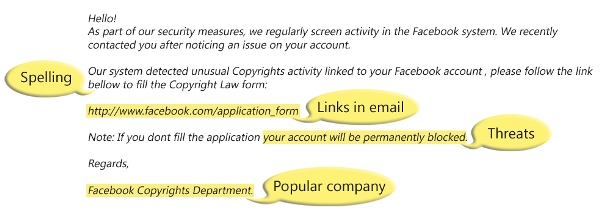
How to spot phishing attacksOnGuard Online recommends that if "you open an email or text, and see a message like this:
The senders are phishing for your information so they can use it to commit fraud" | 
Also watch out for: spelling errors, links to external sites, threats, requests for information. |
What to do
Steps to avoid a phishing attack
| Report a phishing attackForward all phishing attacks to spam@uce.gov and to the organisation that is impersonated.You also may report phishing email to reportphishing@antiphishing.org. The Anti-Phishing Working Group, a group of ISPs, security vendors, financial institutions and law enforcement agencies, uses these reports to fight phishing.  If you are a victim of a phishing attack, you may also be at a higher risk for identity theft. If you know you are a victim, file a complaint with the Federal Trade Commission at www.ftc.gov/complaint |
